How to Install Moleculix
How to Install Moleculix for Python
Moleculix is a Python package and as such need to be installed in a pre-existing Python environment. Moleculix has been tested on Microsoft Windows (7 & 8), Linux -Ubuntu 14.04 and Mac OSX 10.9 Maverick, each using Python 2.7.1.0 Download and install Python
Download a windows Python environment from https://www.python.org/download/releases/2.7.7/ After downloading, follow instruction on how to install it.If you are on Windows, and new to Python, then we suggest that you install the lightweight PyScripter IDE. PyScripter gives you easy access to the Python interpreter.
You can download PyScripter from the ThirdParty download area.
2.0 Run the Moleculix installer
If you are on Windows, just run the automatic installer. The installer will install required Python files, as well as examples into your My Documents/Moleculix folderOn Linux, use Debian package to install Moleculix.
3.0 Test the install
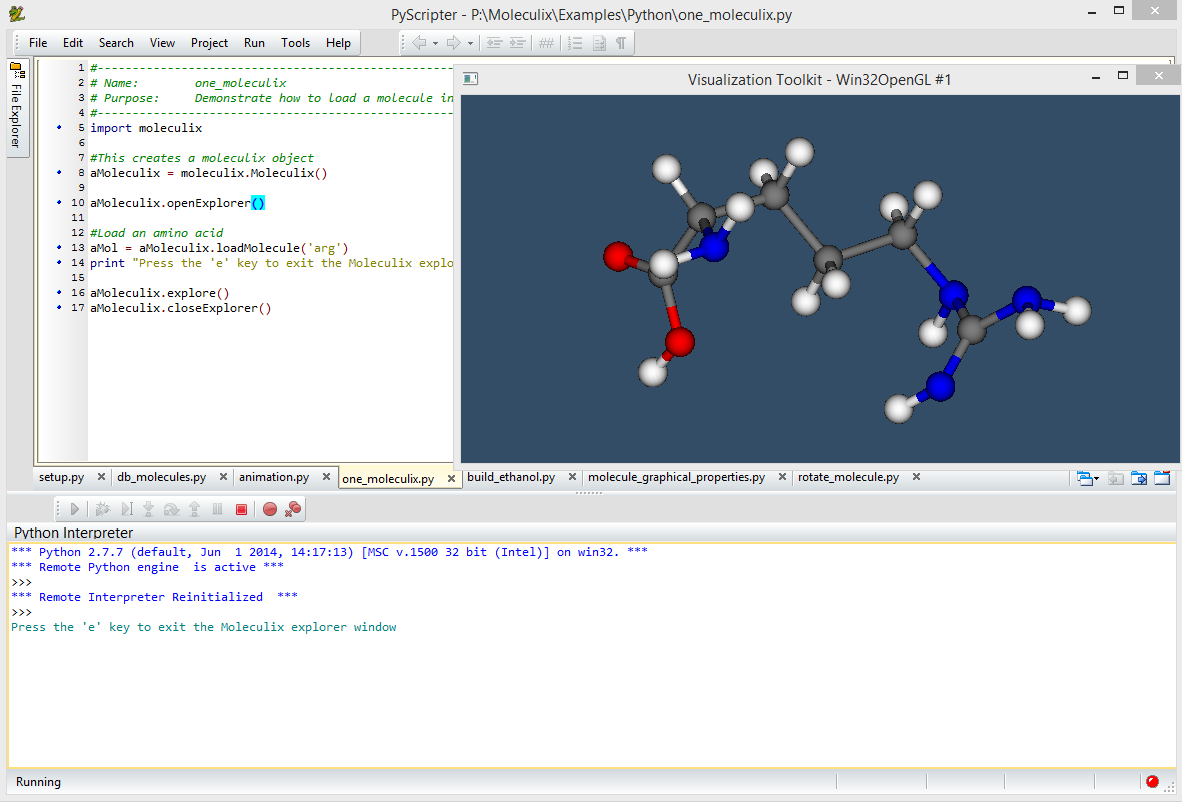
You can test the install by running the example scripts that are part of the Moleculix distribution. The screenshot below shows what you should expect from running the one_moleculix.py example from within PyScripter.